Focus Shift: one large card with a rail of what comes next
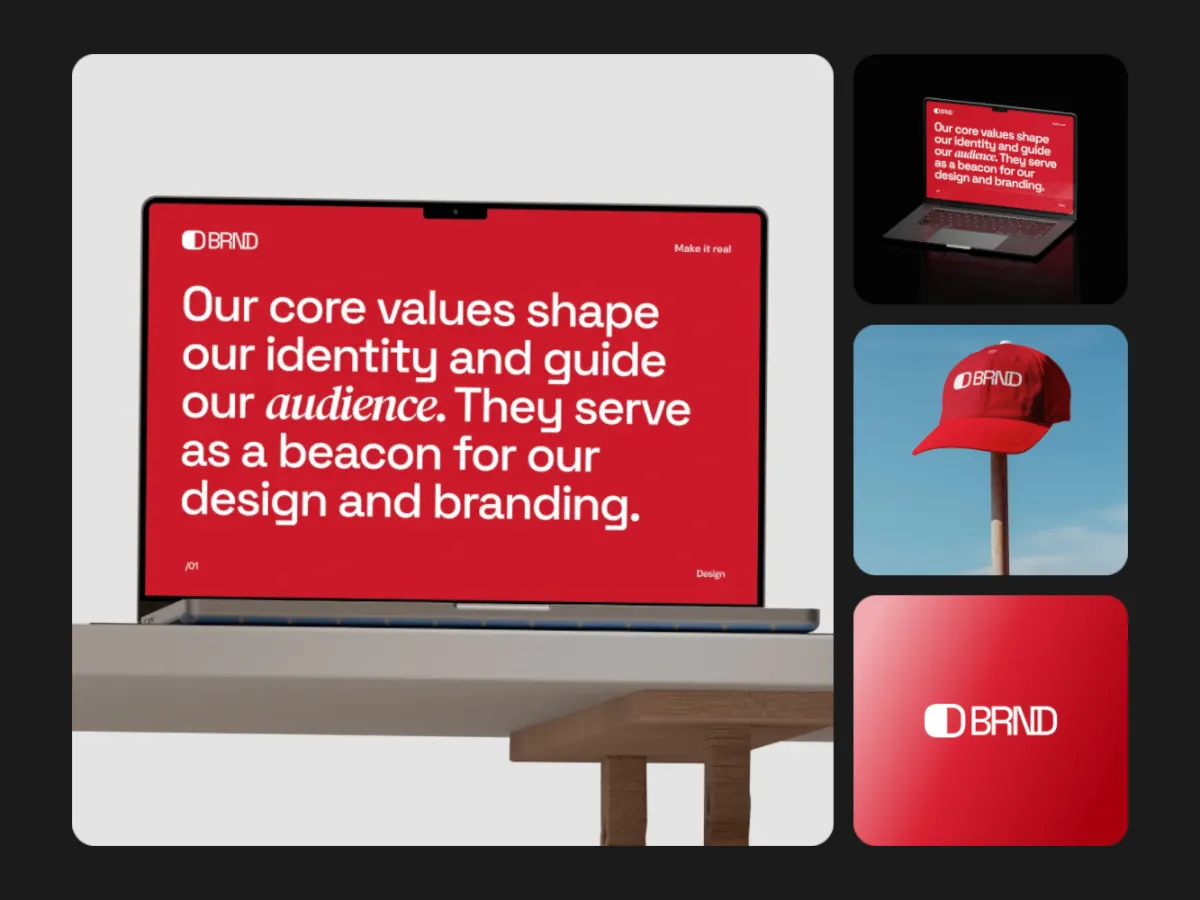
A large main card beside a rail of upcoming pieces; each step the next one takes the stage.
Opens in the studio with sample work. Free at 720p.
How Focus Shift moves
Focus Shift puts one large card next to a rail of the pieces coming up. At each step the next piece grows into the main spot, and the outgoing one slides out and rejoins the end of the rail. In tall frames the rail moves below the main card. With four slots and a 10 second loop, it is a clear layout for case studies and app walkthroughs at 16:9.
In the studio you can tune its 5 settings along with the background, shadow and loop length, and your images never leave your device.
Focus Shift settings
Every setting below is in the studio panel for Focus Shift. Each one changes the loop live, so you can try values while it plays.
| Setting | Range | Starts at |
|---|---|---|
| Padding | 0% to 20% | 6% |
| Corner radius | 0% to 12% | 3% |
| Rail size | 18% to 40% | 26% |
| Gap | 0.5% to 8% | 2.5% |
| Easing | Custom, Smooth, Natural, Slow down, Snappy, Accelerate, Elastic, Bounce, Overshoot, Impulse, Swing, Linear | Smooth |
Make a Focus Shift video
- Step 1
Open the template
"Use this template" opens Focus Shift in the studio at 16:9, already playing with sample work.
- Step 2
Add your work
It starts with 4 spots for images or short videos. Empty spots repeat your images, so a few are enough.
- Step 3
Tune the motion
Change the 5 settings above, the loop length (10 seconds to start), background and shadow.
- Step 4
Export the loop
Download MP4 or WebM. 720p is free with a free account and no watermark; 1080p, 2K and 4K come with Pro.
Where Focus Shift works well
More Spotlight & Focus templates
Other kinds of motion
- 3D & Perspective 13
- Multiscene 8
- Isometric 4
- Orbit 9
- Carousel & Flow 11
- Grid 9
- Spotlight & Focus 4
- Reveal & Wipe 4
- Stack & Scatter 8